Software companies charge rent.
We think you should own.
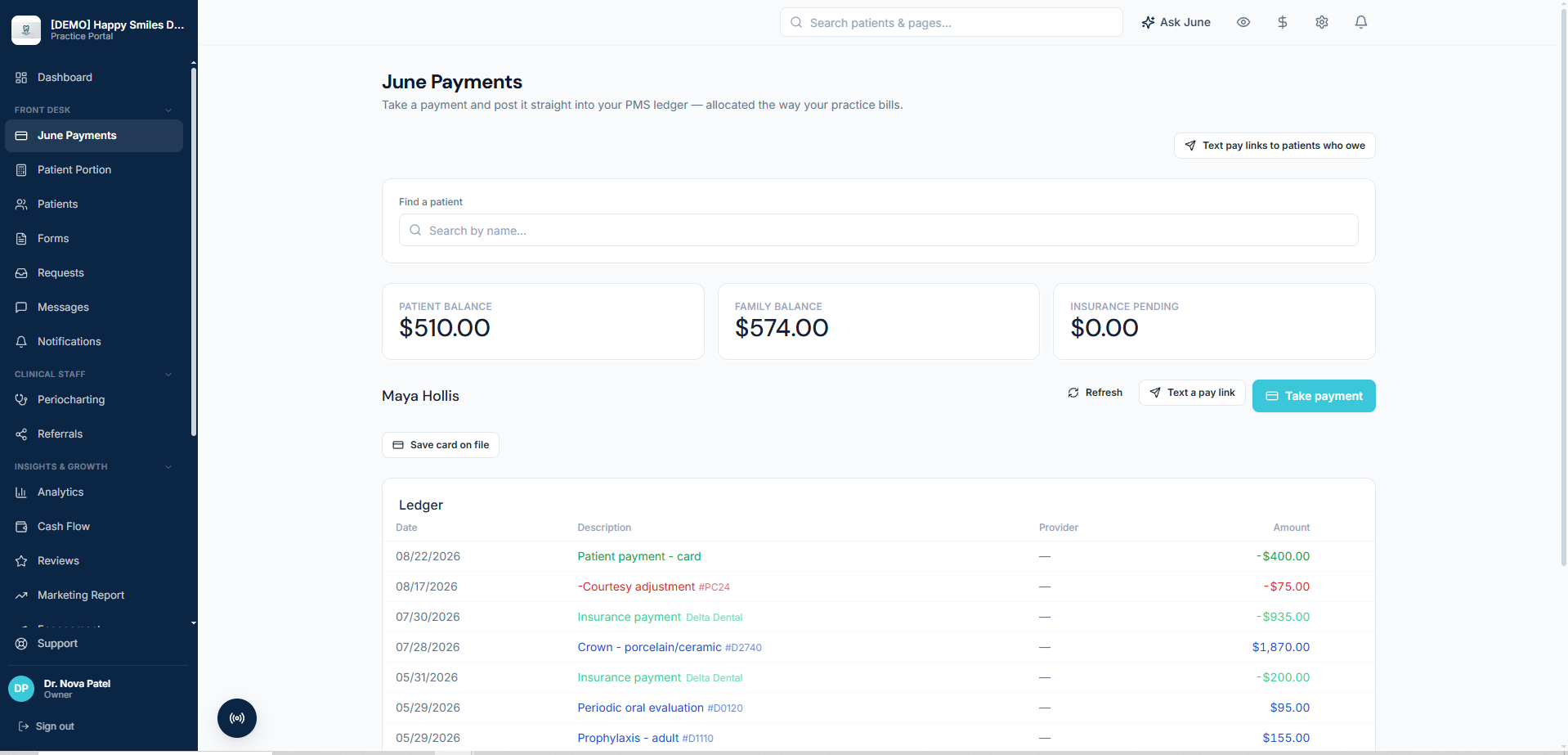
June Portal is a patient app and practice portal built by dentists, for dental practices. It plugs into your existing practice-management system and gives patients an app that looks and feels like your practice's own, where they schedule, pay bills, sign forms, and message your front desk. There is no monthly subscription.
So June works the way we wished software did: your own branded patient app, running on the practice management system you already have. Run your payments through June and we match your payment processor's rate — that's how we earn money, and there's no software bill at all.
- No software bill when you process with June
- No per-user pricing
- No annual contract
- No switching your PMS

So how do we actually make money?
Two ways, and you pick which one. You're already paying someone to take card payments — run them through June instead and we match the rate you're paying now, with no software bill on top. Rather keep your processor? Then June is a straightforward monthly plan. Same platform either way.
Process with June
$0 / month
We match your current processor's rate. That's how we earn — so the software costs you nothing beyond what you already spend to get paid.
- The entire platform — nothing is held back
- No per-user or per-seat pricing
- No annual contract
- No migration off your practice management system
Keep your processor
Monthly plan
Happy with the processing relationship you have? Keep it. June becomes a simple monthly subscription instead — no bundling, no pressure to switch.
- The entire platform — nothing is held back
- No per-user or per-seat pricing
- No annual contract
- No migration off your practice management system
Either way there's no seat count to manage and nothing to migrate. Most practices take the first option, because they were going to pay a processor anyway — and this way the software comes with it.
Patients book themselves.
It lands on your real schedule.
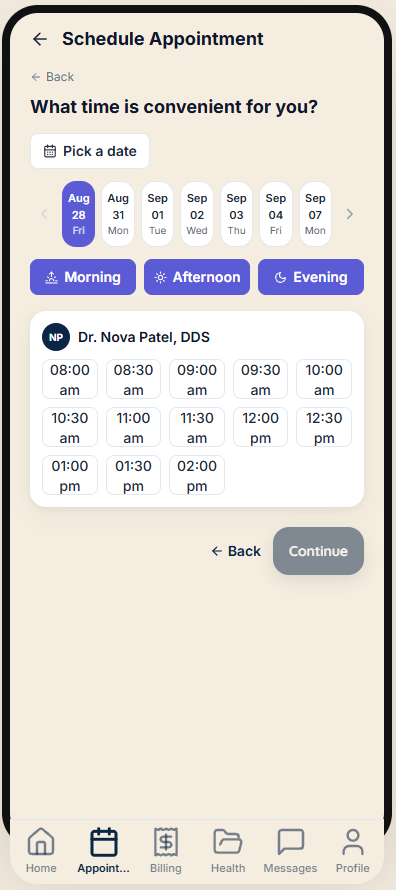
Most online scheduling sucks. June doesn't. Its fully customizable so patients can book procedures from their treatment plan and it hits your schedule with the correct provider, and correct timing. Chart Audits will catch if that crown needs a new PA for insurance billing, or if the patient is due for a cleaning and can take that hygiene slot that just opened up. Push-notification appointment reminders, Automatic Waitlist, and Recall Reactivation keep the schedule filled.
Availability comes from your PMS, not a guess
Provider rules, operatory assignments and blockouts are respected, so patients only ever see time you can actually honour.
Staff approval when you want it
Prefer to eyeball every booking first? Turn on approval mode and nothing hits the schedule until your team says yes.
You keep your practice management system
June layers on top of the system your office already runs. There's no migration, no data re-entry, and no retraining the whole office.
In the patient's app
Hygiene Visit
Tue, 2:00 PM · 60 min
On your practice management system
2:00 PM · Hygiene
Op 3 · Rachel T., RDH
It isn't a portal.
It's your practice's app.
Your name at the top. Your logo. Your colours. Patients install it on their iPhone or Android home screen and it looks like something you built — because as far as they're concerned, you did. Nothing on the screen says June. That's the difference between an app your patients open and one more portal login they forget by the second visit.
Your brand, end to end
Practice name, logo, colours and providers — every office gets its own look, and its own isolated data.
Built for how families actually work
Link children and dependents, then switch between their records in a single tap. One login for the whole household.
Everything in one place
Book, check in, sign forms, view X-rays, message the office, see insurance and pay the balance — without a phone call.

June does the typing.
Your team does the deciding.
The busywork that eats a dental team's day is mostly transcription: writing the note, writing the reply, retyping the paper form. June drafts all of it and then stops and waits for a human. Nothing sends, files or writes back to a chart until someone on your team approves it.
Clinical notes, drafted from the visit
Record the appointment with the patient's consent and June drafts the note. The provider reviews, edits and approves before anything writes back to the chart.
Smart inbox
Patient messages arrive with a ready-to-send reply already drafted from their actual record. Staff approve in a click — or rewrite it.
Turn paper forms digital by photographing them
Snap a picture of any form your office already uses and June rebuilds it as a digital, signable version.
Ask June
Ask your own practice data a question in plain English — no report builder, no pivot table, no waiting on a consultant.
Patient asked
"Is my crown appointment still on for Thursday, and how much will I owe?"
Suggested reply
Yes — you're confirmed for Thursday at 10:00 AM with Dr. Ellis. Your estimated portion after insurance is on your treatment plan in the app, and you can pay it there any time before the visit.
Nothing sends on its own. Your team approves every message.
Patients say yes more often
when they know the number.
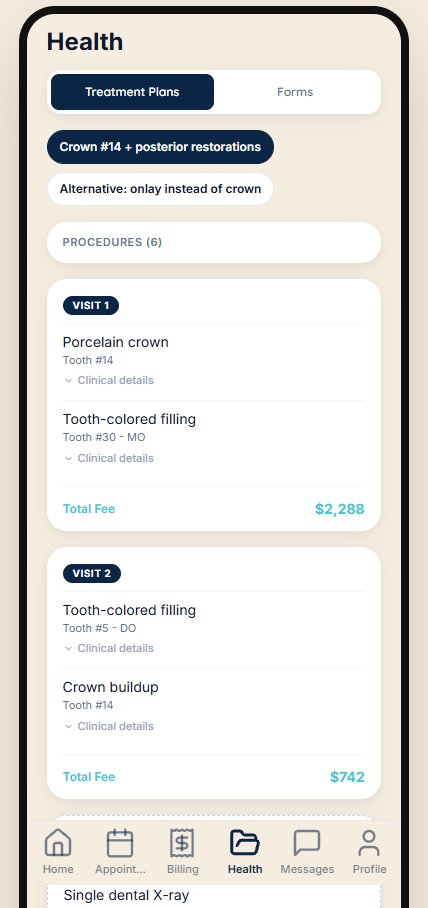
Most treatment isn't declined because the patient doesn't want it — it's declined because nobody could tell them what it would cost, so they said they'd think about it. June puts the real number in front of them, with their insurance already applied, and a way to pay it right there.
Insurance estimates, in the patient's hands
Coverage, deductible and remaining benefit pulled from their plan — so the estimate is theirs, not a generic price list.
Treatment plans they can actually accept
Presented by visit sequence with costs broken out, then signed in-app. Codes and fees freeze at signature.
Payment plans that collect themselves
Automatic scheduled charges mean the front desk isn't chasing balances, and the A/R doesn't quietly age.
In-house membership plans
Build your own plan with per-procedure discounts and family pricing. Uninsured patients enrol and manage it from the app.
Before they say yes
Crown — what you'll owe
Sample figures, shown to illustrate the layout.

The patient app
Patients download your practice's app from the App Store or Google Play. It carries your name, your logo, and your colors, and no vendor branding appears anywhere on the screen. Appointments, forms, bills, membership, family access, and messaging all live inside it. To your patients it is simply your practice's app.
Patients can see their own X-rays and intraoral photos in it, next to the post-op instructions for what they just had done and the treatment plan they're deciding on. Most people have never looked at their radiographs anywhere except the chairside monitor, with the dentist talking over them. Families link together, so one parent handles everyone's appointments from one login.
AI throughout
June has AI running through the whole product rather than bolted onto one corner of it. It writes your clinical notes and your patients' visit summaries, suggests your front desk's replies, charts perio by voice, and answers questions about your practice numbers asked in plain English. All of it runs under a signed Business Associate Agreement.
Record a visit and June drafts the clinical note for you to review and sign, then writes a separate plain-language summary for the patient explaining what was done and what comes next. When a patient messages the office, June suggests the reply and a person approves it before it sends. Call out probing depths and June charts them, writing the finished chart back to your practice-management system. It builds a digital form from a scan of a paper one and reads insurance EOBs. Ask it how many new patients you saw last month and it answers from your own data instead of making you build a report.
Everything above sends patient information to a model, which under HIPAA makes the company running that model a business associate that has to sign a BAA first. June's has. It's worth asking every vendor whose AI you evaluate.
Keep the schedule full
June keeps your schedule full by letting patients book real appointments themselves, then filling the gaps on its own when something falls through. Scheduling follows your own booking rules, and the waitlist works itself without anyone at the front desk picking up the phone.
Booking is configured the way your practice actually books: your appointment types and lengths, your providers, your operatories, your blockouts. Patients book real appointments for real treatment, scheduled the way your front desk would have done it, and every booking writes back to your practice-management system in the right operatory under the right provider. Staff can approve requests first if you'd rather check them.
When an appointment falls through, June texts the patients who wanted an earlier slot, in order, and the first to accept takes the time. Reminders arrive as push notifications from your own app rather than a text from a number nobody recognizes, and patients add the appointment to their phone's calendar in one tap. A single “C” from a shared family handset confirms everyone's appointments at once. Patients check in the day before, confirming their history, insurance, and consents, so the appointment starts in the chair.
No monthly subscription
June Portal has no monthly subscription. Instead, June earns a small share of the patient payments it processes for your practice, so June only makes money when it's collecting money for you. There are no per-seat fees, no contracts to justify, and no new line item in your software budget. In fact, we hope June lets you drop a few of the subscriptions you already pay for.
A subscription vendor has already been paid by the time you find out whether the product worked. June hasn't. If patients don't book, don't pay, and don't use the app, June doesn't earn.
And the hundred smaller things a practice runs on
The four above are the reasons practices switch. These are the reasons they stop paying for anything else.
Patient Experience
9Read more →Digital check-in
Health history, insurance and consents completed before they arrive.
Secure messaging
Two-way chat with photo and file attachments, plus SMS fallback.
Online bill pay
Balances, transaction history and payment from the phone.
Automated follow-ups
Unscheduled treatment, overdue hygiene, appointment and payment nudges.
Plain-language visit summaries
AIAfter each visit, a clear recap of what was done and what comes next.
Referral program
Per-patient codes, a share sheet, and credits applied to their account.
Reputation management
Post-visit review requests, with feedback routed before it goes public.
Loyalty rewards
Points for repeat visits and referrals, redeemable in-app.
Add to calendar
One tap puts the visit — time, provider, procedures — on their phone.
Clinical Tools
6Read more →Consent forms
Tied to procedures, with reminders and signed-copy storage.
X-ray & intraoral viewer
Full-screen, pinch-to-zoom, labelled by image type.
Post-op instructions
Procedure-specific aftercare, in the app whenever they need it.
Recall tracking
Colour-coded urgency and one-tap booking into live availability.
Voice perio charting
AICall readings out hands-free; completed charts write back to the PMS.
Specialist referrals
AIRefer out with X-rays and tooth numbers attached via a secure link.
Practice Operations
8Read more →Morning huddle
The day at a glance — schedule, targets, birthdays, open tasks.
Analytics & reporting
Production, scheduling, hygiene, A/R and acceptance, computed from synced data.
Reminders & campaigns
Configurable reminders and bulk SMS with reusable templates.
Review requests
Prompt automatically; guide happy patients to public reviews.
Staff roles & permissions
Invite the team and control who can see what, by role.
Waitlist management
SoonReach waitlisted patients the moment a cancellation opens a slot.
Internal team messaging
SoonStaff channels, direct messages and file sharing.
Conversation tools
SoonTags, internal notes, read receipts and after-hours auto-replies.
Integration & Data
5Read more →Works with your PMS
Live two-way integration with the practice management system your office already runs.
Import & sync
Full imports with deduplication, validation and dry-run previews.
Payment processing
Bill pay, subscriptions and referral credits on one payment rail.
SMS infrastructure
Twilio-backed reminders, campaigns and inbound reply handling.
Per-practice customisation
Name, colours, logo, providers, hours — and which features are on.
Family & Records
2Read more →Dependent linking
Approved family access with one-tap switching between records.
Record transfer
Patient-initiated, admin-approved transfers between practices — scoped and expiring.
Why Practices Choose June
Built by dentists, for dentists
Front-office efficiency, amplified
One platform — no more fragmented vendors

Summertime for your practice
Built for patient data from day one
Not a compliance checkbox bolted on later — multi-tenant isolation, encryption and audit logging are how the platform was put together.
AES-256-GCM at rest
Patient data, integration credentials and MFA secrets are encrypted at rest, with keys managed separately from session credentials.
Every access logged
PHI access is audit-logged across the platform, and the logs themselves are PHI-free. Each patient chart has its own access-history tab.
Locked-down staff access
TOTP multi-factor authentication, automatic lockout after repeated failures, role-based permissions, and sessions you can revoke instantly.
A BAA, and AI under one too
A HIPAA business associate agreement comes with every account — and June's AI features run on infrastructure covered by its own BAA, so patient data never leaves that boundary.
The fastest way to judge this is to watch it book.
Tell us your practice management system and we'll walk you through June on a live schedule — booking, forms, an insurance estimate, a payment. Fifteen minutes, no slide deck, and nothing to cancel afterwards.